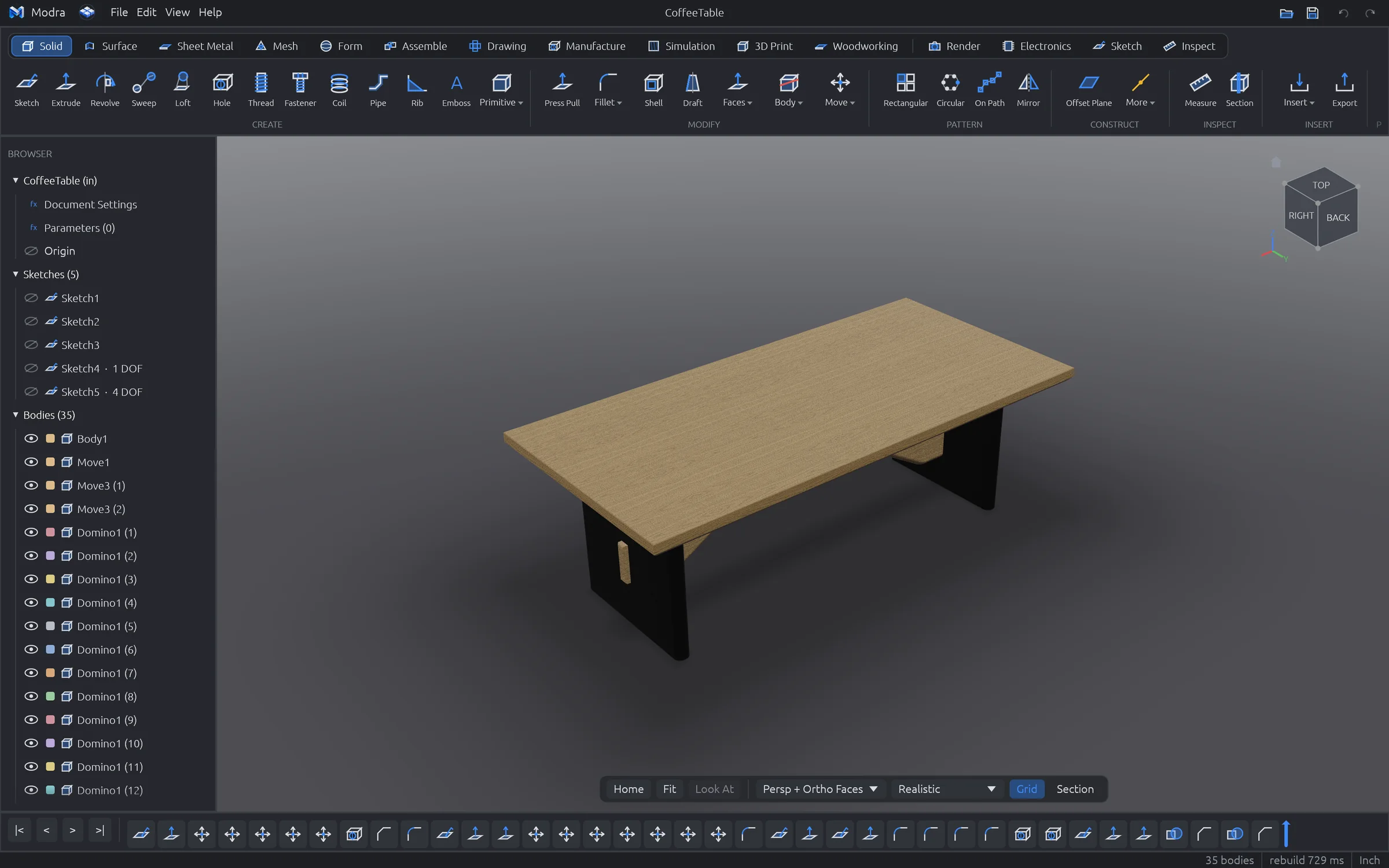
Modra is parametric 3D CAD from the Mostly Built garage. It doesn't stop at the model: it tells you what your part will cost, how it'll be made, what lumber to buy and where it's going to fail. Your designs live on your computer, not someone's cloud.
Most CAD stops when the model looks right. Modra keeps going, because the hard part of a build is everything after the model.
Free, with your designs as plain .modra files on your own disk. No login, no subscription, no cloud that holds your work hostage. It even works on a laptop in the shop with no Wi-Fi.
Instant cost and manufacturability for CNC, 3D printing, sheet metal, moulding and woodworking. Costed bills of materials, lumber plans and tolerance stack-ups, built in.
Model it, draw it, simulate it, then send it out: DXF for the laser, G-code for the CNC, STLs for the printer, a project packet for the bench. One app, one file.
Every screenshot here is Modra exactly as it ships. No mock-ups.
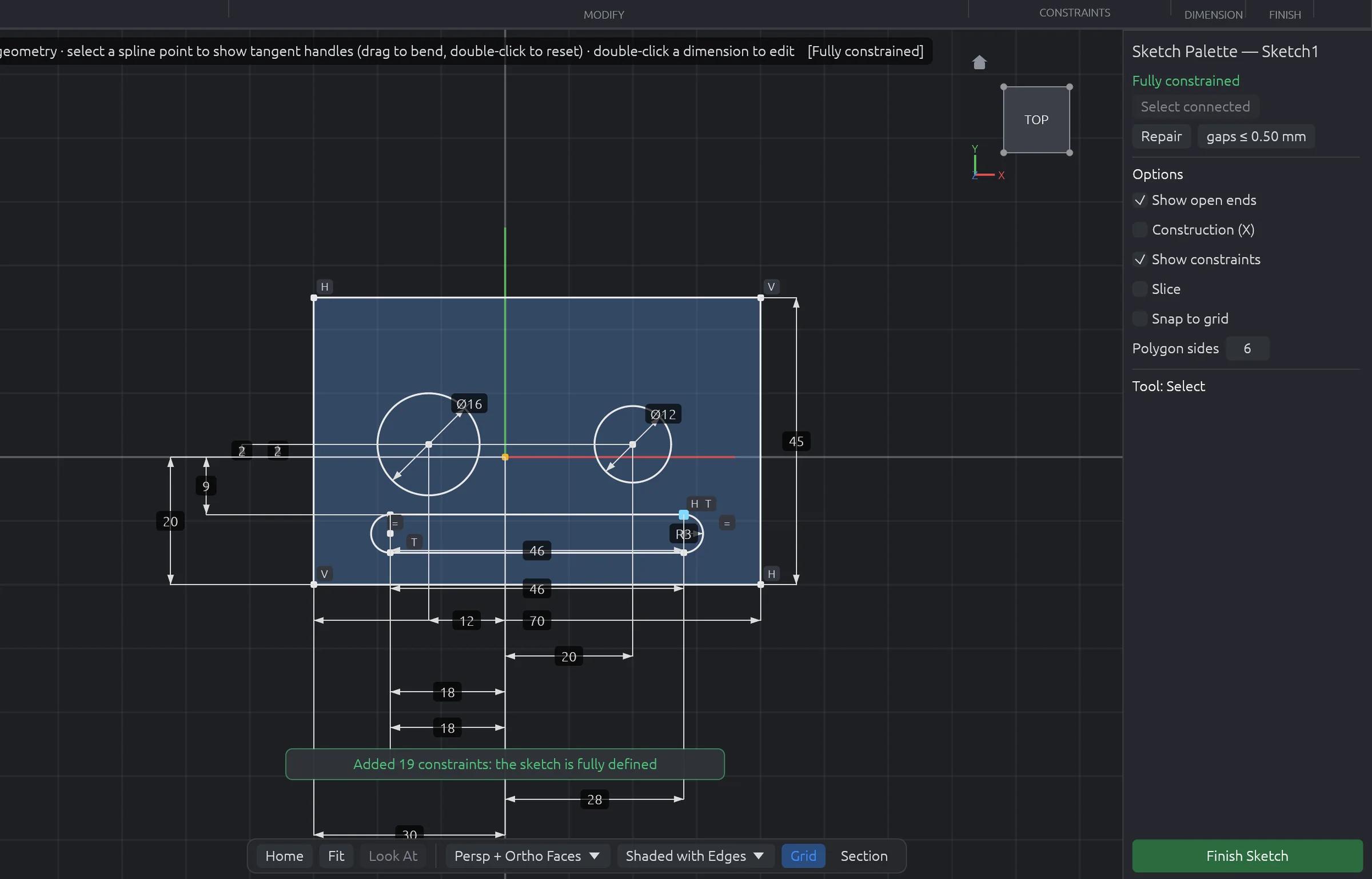
A real constraint solver under 43 tools: lines, arcs, splines, conics, slots, polygons, text, offsets and patterns. Then the part other CAD leaves to you: one click adds every missing dimension and relation without moving a thing.

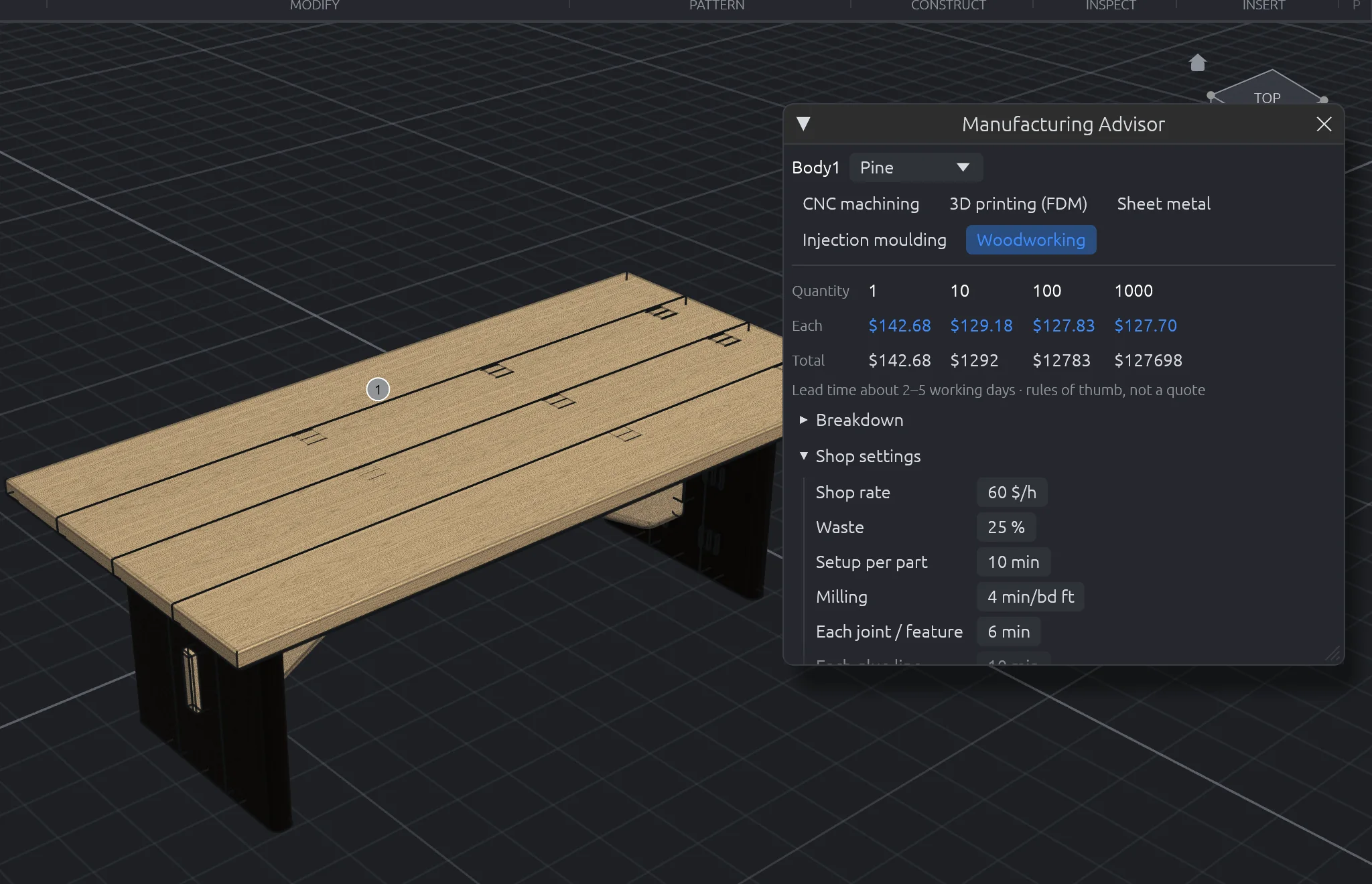
Pick a process and Make It answers on the spot: price at 1, 10, 100 and 1,000 parts, lead time, and the problems that will bite you, marked right on the model. Woodworkers get board feet, milling, joinery, sanding by area and finish by coat, from your own shop rates.

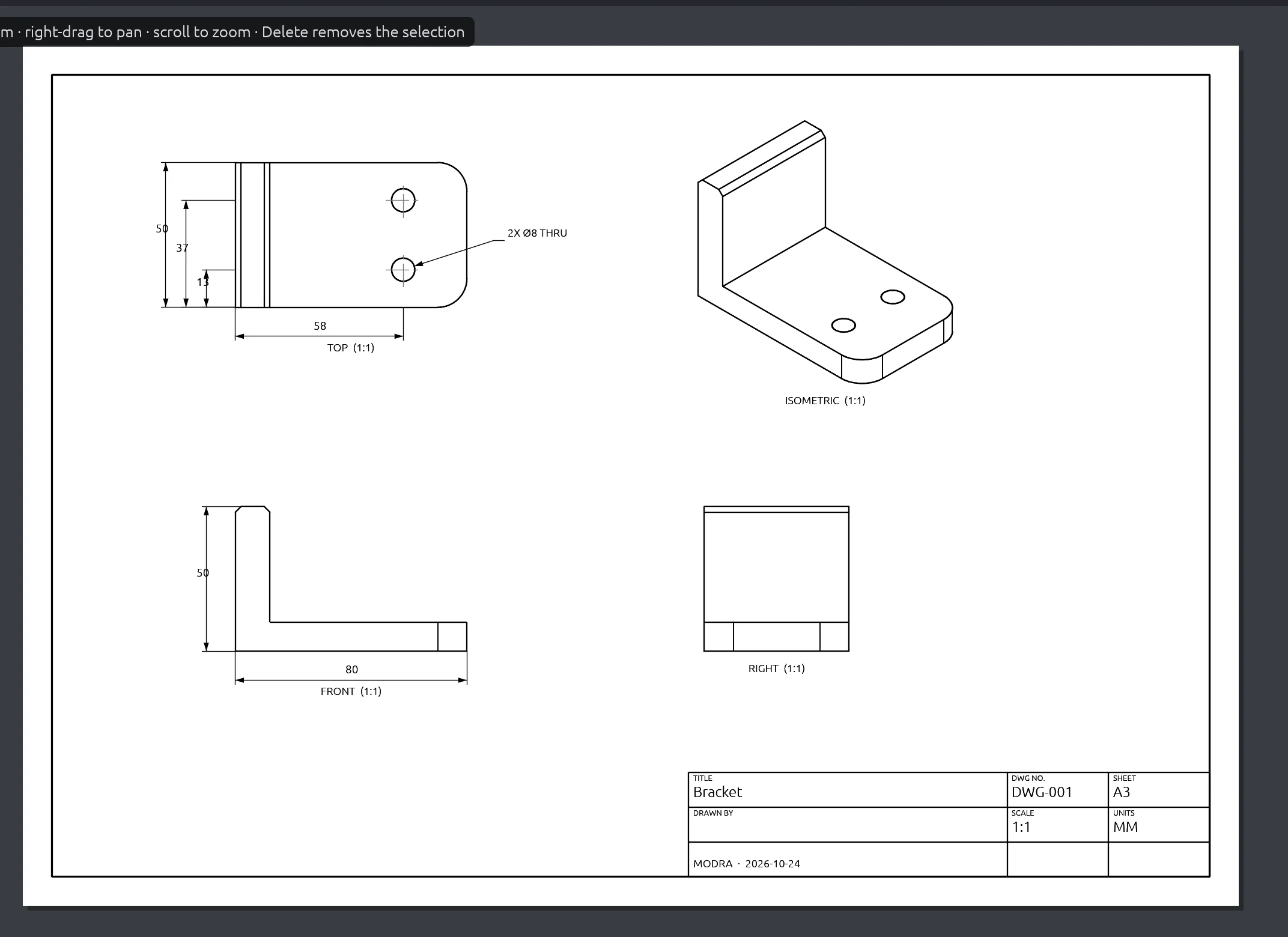
Hidden-line views, sections and details from the model. Auto Dimension adds overall sizes, hole callouts and positions to every view without doubling up, and every dimension follows the model when a parameter changes.

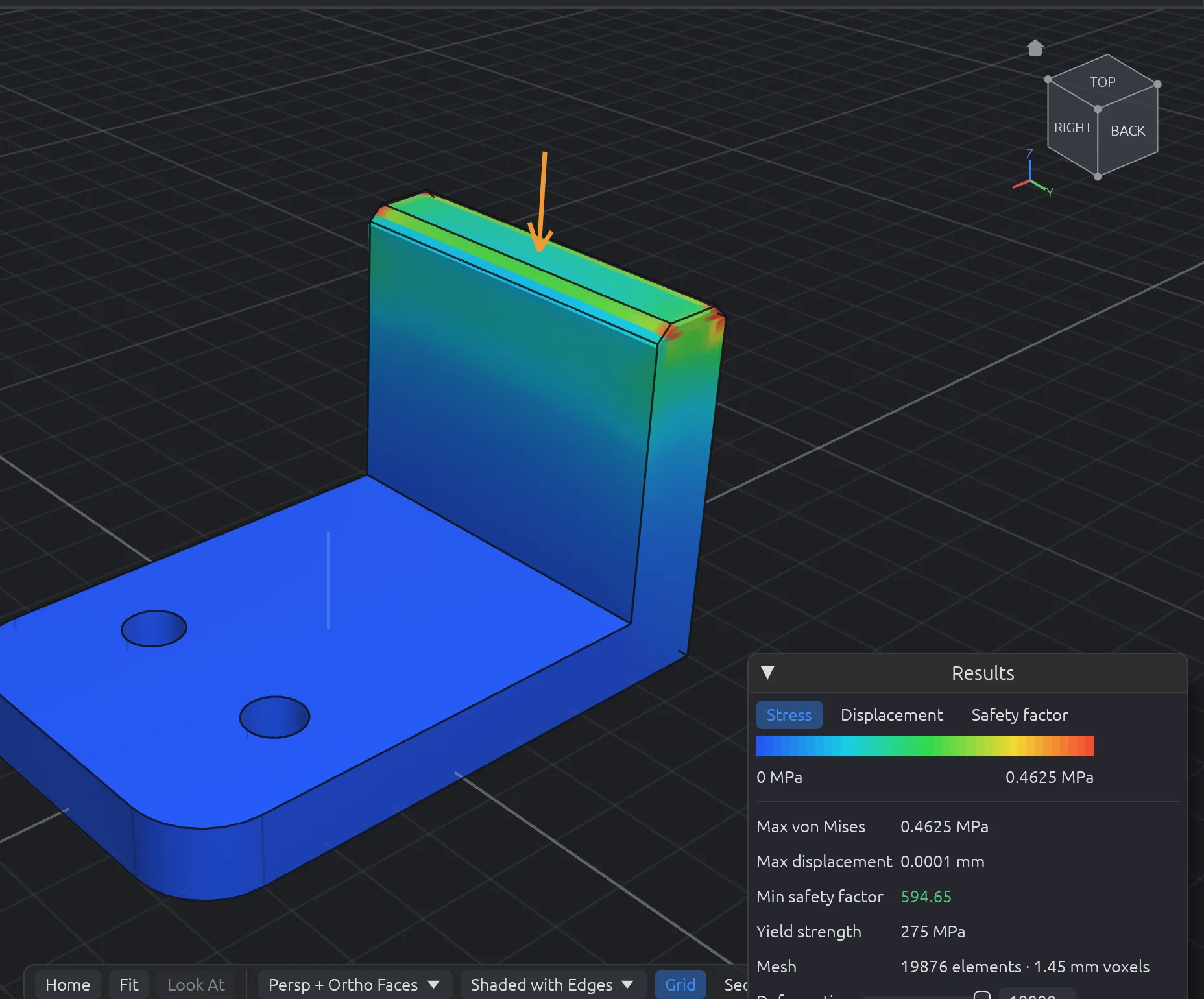
Static stress, natural frequencies and heat flow, solved on your machine in seconds. Pin a face, push on another, and read stress, displacement and safety factor in colour on the part.

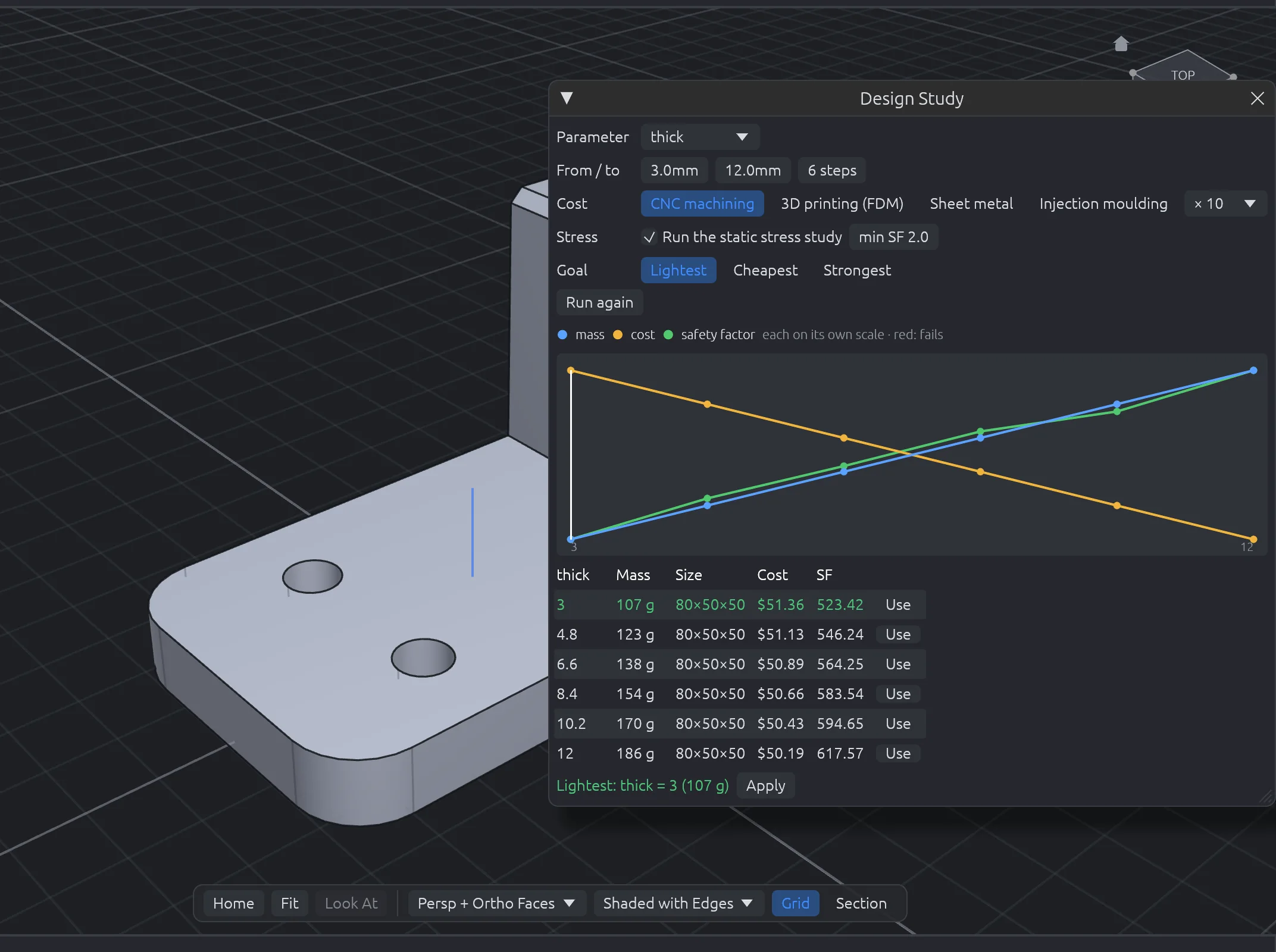
Sweep any parameter across a range. Modra rebuilds each version in the background and charts mass, cost and safety factor, then picks the lightest, cheapest or strongest version that still passes. One click applies it.

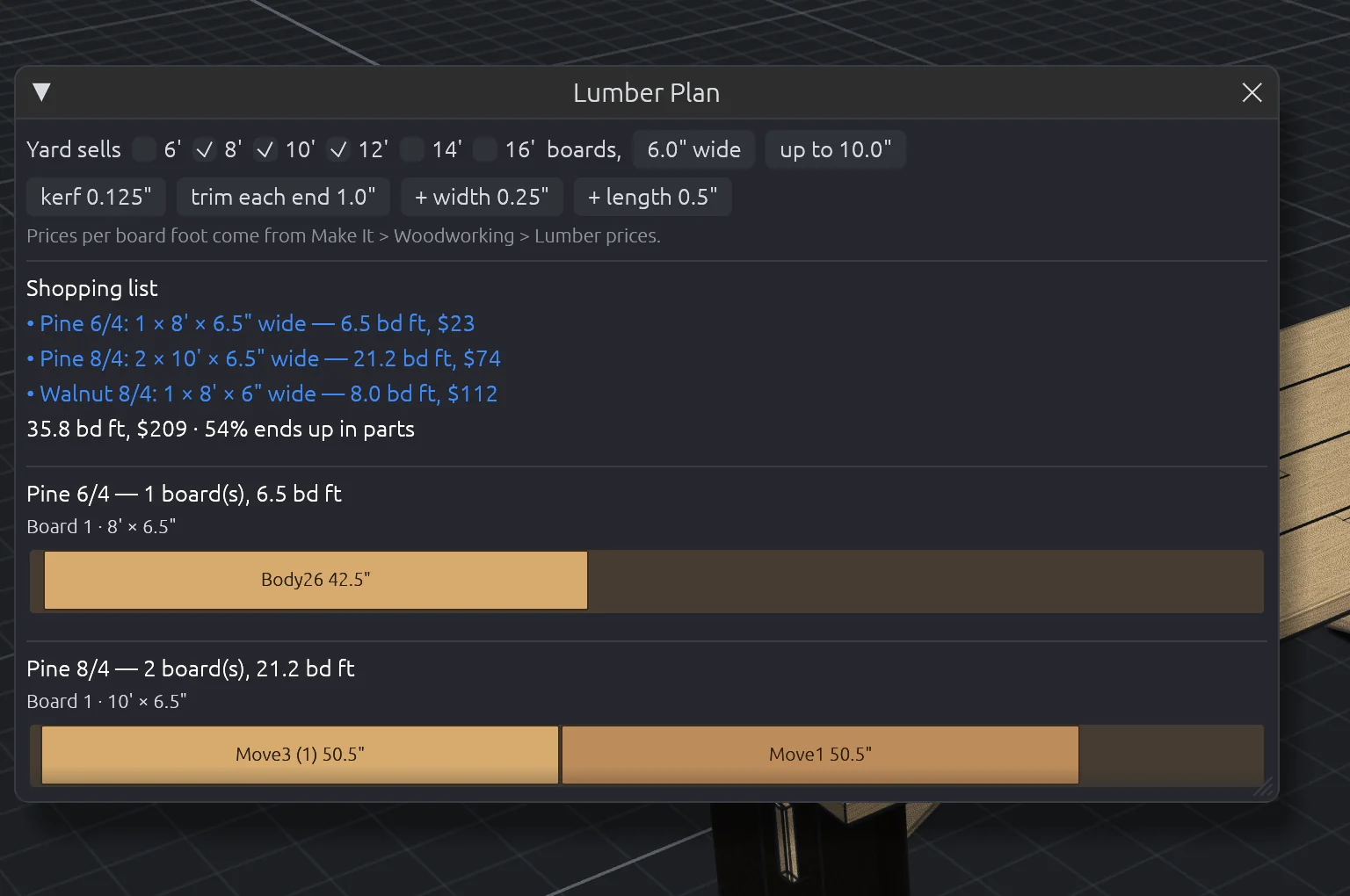
Boards from your stock list and real joinery: dovetails, box joints, mortise and tenon, dados, pocket holes, dowels, dominos and biscuits. Generators for cabinets and drawers. Then a lumber plan that tells you exactly which boards to buy and how to cut them.

Switch tabs, not programs. Every workspace shares the same model, timeline and file.
Extrude, revolve, sweep, loft, fillet, shell, patterns.
43 tools and a live constraint solver.
Patch, ruled, offset, trim, stitch, thicken.
Flanges, hems, flat patterns, bend order, nesting.
Repair, reduce, remesh and convert STL scans.
Subdivision modelling for organic shapes.
Components, joints, limits and motion.
Views, auto dimensions, GD&T, parts lists.
Measure, check, study, compare, stack-up.
CAM pockets, contours, drilling and G-code.
Stress, modal and thermal studies.
Orient, split for print, overhangs, 3MF.
Joinery, cabinets, lumber plans, packets.
Materials, decals and photoreal scenes.
Schematics, PCBs, KiCad import, enclosures.
In most professional CAD, these live in premium tiers, add-ons, spreadsheets or a different program. In Modra they're part of the app.
| Capability | Modra | Typical professional CAD |
|---|---|---|
| Price | Free, forever | Usually a yearly subscription |
| Files stored locally, works fully offline | Always | Often cloud-first or tied to an account |
| Instant cost & manufacturability for five processes | Built in | Add-on or a separate quoting service |
| Costed bill of materials per assembly | Built in | Usually a spreadsheet |
| Parameter sweeps with stress and safety factor | Built in | Usually a premium simulation tier |
| Tolerance stack-up, worst case and RSS | Built in | Add-on or a spreadsheet |
| One-click fully defined sketches and sketch repair | Built in | Partly, or by hand |
| Lumber plan, cut list and shop packet | Built in | Rarely offered |
| Design check with one-click fixes | Built in | Error list without fixes |
A wave of new open-source CAD apps can sketch, model and draw. Modra goes on from the model to making it.
| What you can do | Modra | New open-source CAD apps |
|---|---|---|
| See what a part costs to make, with manufacturability checks, for five processes | Built in | Not offered |
| CNC toolpaths and G-code for 11 machine controllers (GRBL to Fanuc and Haas) | Built in | Not offered |
| Stress, modal and thermal simulation | Built in | Not offered |
| Photoreal renders: HDRIs, studio lights, textures, turntables | Built in | Not offered |
| Sheet metal with flat patterns, bend tables and press brake checks | Built in | Not offered |
| Woodworking joinery, cabinets, cut lists, lumber plans and a shop packet | Built in | Not offered |
| 3D print prep: overhang checks, splitting parts to fit the bed | Built in | Not offered |
| Circuit boards in the 3D design | Built in | Not offered |
| Costed bill of materials for the whole assembly | Built in | Not offered |
// Compared with the feature lists the new open-source CAD apps publish, October 2026. They're moving fast; if one adds any of these, tell us and we'll update this.
Completely free. No subscription, no account, no catch. Pick your system below.
.dmg and drag Modra into Applications..zip and run modra.exe. If it reports a missing VCRUNTIME140.dll, install the Microsoft Visual C++ runtime (x64). The installer does this for you.uname -m: x86_64 takes the x86-64 build, aarch64 the ARM64 one.chmod +x Modra-0.5.1-Linux-x64.AppImage./Modra-0.5.1-Linux-x64.AppImagearm64). The .tar.gz works too: extract it and run ./modra.flatpak install --user Modra-0.5.1-Linux-x64.flatpak, then open Modra from your apps.xdg-desktop-portal.Modra ships in the open and improves every month. Here's how releases work, and what's coming next.
Every change is built for macOS, Windows and Linux and has to pass the full automated test suite before it lands. This is where new features show up first, in the garage.
A tested snapshot every month, with release notes and a build video on the channel. Features may still change shape based on what you tell us.
From 1.0: quarterly releases with fixes backported, for shops that want the same tool all season. Signed installers and in-app updates.
The full modelling core and every workspace above, ready to try on real projects.
Getting Modra onto every machine in the shop, and making it easy to learn.
The power-user features on the list, plus a full product rendering studio.
Letting the community extend Modra and share what they make.
A tool you can bet a business on.
// Dates are targets, not promises. Priorities follow what makers actually need: suggest a feature.
Yes, completely. Modra is free to download and use, for hobby or business, with no subscription, no account and no paid tier. That doesn't change at 1.0.
On your computer, as .modra files you can copy, back up, email or put in any folder you like. Modra also autosaves so a crash doesn't cost you work. There's no account and nothing is uploaded.
Yes. The file format is versioned, and newer versions of Modra open files from older ones. That guarantee becomes permanent at 1.0.
Import and export STEP, IGES, STL, OBJ, 3MF and BREP. Bring DXF or SVG into sketches. Export drawings as PDF, SVG or DXF, flat patterns as DXF, CNC programs as G-code, and KiCad boards come in as 3D.
No. Everything, including simulation and cost estimates, runs on your own machine.
Modra is written in Rust, with the OpenCascade geometry kernel (LGPL-2.1) and a GPU viewport through wgpu. That's why it's fast, and why it runs natively on macOS, Windows and Linux.
Use the bug report form (attach screenshots of the problem) or suggest a feature. In Modra, Help → Report a Bug opens the form with your version filled in. Feature requests from people building real projects jump the queue.
Modra is free. Download it, open a sample and have a part priced in under a minute.